
How to get Microsoft Teams on Apple Watch
The short answer: Microsoft does not make a Teams app for Apple Watch. Teams alerts from your iPhone can show on your watch, but you cannot open your chats there. To read and reply to Teams chats on the watch itself, you need a third-party Apple Watch app such as Strapline, which works with your work or school Microsoft 365 account.
In this guide, and the guides that go with it
This is the main guide. For more depth: how to make and receive Teams calls on Apple Watch, how to use Teams on Apple Watch without an iPhone, Teams and Intune: Apple Watch deployment, how to approve Strapline in Microsoft Entra, and Teams alerts on Apple Watch or Strapline: which do you need?.
Is there an official Microsoft Teams app for Apple Watch?
No. Microsoft offers Teams for iPhone, iPad, Mac, Windows, Android and the web, but there is no Teams app in the Apple Watch App Store from Microsoft. Microsoft's own support community confirms there is no official watch app.
Option 1: Teams alerts mirrored from your iPhone
This works with nothing extra to install. When Teams on your iPhone sends a notification and your iPhone is locked, Apple Watch can show that alert on your wrist.
- On your iPhone, open Teams, tap your profile picture, then Settings, then Notifications, and make sure chat notifications are on.
- In iPhone Settings, open Notifications, then Teams, and allow notifications.
- Open the Watch app on your iPhone, tap Notifications, scroll to the list of iPhone apps whose alerts the watch mirrors, and turn on Teams.
What you get: the alert, with the sender and a preview. What you do not get: a list of your chats, the rest of the conversation, reactions or your colleagues' status. Alerts only arrive while your iPhone is connected, and while the iPhone is unlocked they usually stay on the iPhone.
Option 2: a Teams app on the watch with Strapline
Not sure whether mirrored alerts are enough? See Teams alerts on Apple Watch or Strapline: which do you need?
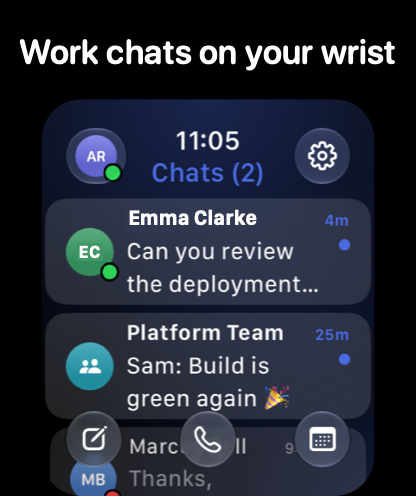
Strapline is an Apple Watch app for Microsoft Teams, published by Daeza Pty Ltd in Australia. It puts your Teams chats on your wrist:
- See your recent Teams chats, newest first.
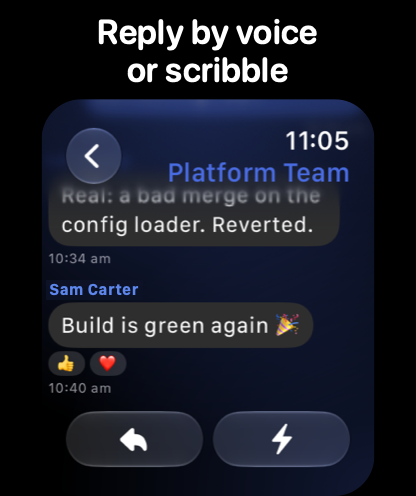
- Read the whole conversation, not just the alert.
- Reply by dictation, scribble or quick replies you write yourself.
- React to messages, edit or delete your own, and see whether a colleague is available, busy or away.
- See today's and tomorrow's meetings, accept or decline, and join from the alert a minute before.
- With Page, an urgent message keeps tapping your wrist until you acknowledge it.
- Get alerts for new messages within seconds.
- Keep working over Wi-Fi or cellular when your iPhone is out of reach. See using Teams on Apple Watch without an iPhone.
- With Strapline Pro + Calls, call a colleague on Teams or join a Teams meeting from the watch. See the calls guide.
How to set up Teams on Apple Watch with Strapline
- Install Strapline from the App Store on your iPhone, or straight on your Apple Watch.
- Sign in with your work or school Microsoft account on Microsoft's own sign-in page, including multi-factor sign-in. Sign in once on your iPhone and the watch is signed in too.
- Open Strapline on your watch. Your Teams chats appear.
- If you see "Need admin approval", your organisation asks IT to approve apps that read Teams chats. Send your administrator the link to the Entra approval guide; they can approve it for everyone in one step.
What you need
- An Apple Watch paired with an iPhone.
- A work or school Microsoft 365 account that includes Teams. Personal Microsoft accounts do not work, because the Teams chat service does not offer them to apps.
- If your organisation uses Microsoft Intune, Microsoft Authenticator on your iPhone. Your watch then works through your iPhone, so keep it nearby. Your administrator can read the Intune guide.
Which option should you use?
| On your Apple Watch | Mirrored iPhone alerts | Strapline |
|---|---|---|
| Alert with sender and preview | Yes | Yes, within seconds |
| List of your Teams chats | No | Yes |
| Read the whole conversation | No | Yes |
| React to messages | No | Yes |
| See colleagues' status | No | Yes |
| Works with your iPhone out of reach | No | Yes, over Wi-Fi or cellular |
| Meeting alerts with Join on watch | No | Yes |
| Teams calls and meetings | No | Yes, with Strapline Pro + Calls |
| Cost | Free | From A$2.99 a month after a 3 day welcome period |
If you only want to know that a Teams message arrived, mirrored alerts are enough and cost nothing. If you want to read the conversation, reply, react or see status from your wrist, or use your watch without your iPhone, you need a watch app. Strapline is free to download with a 3 day welcome period, then A$2.99 a month, A$19.99 a year or A$39.99 once for Lifetime, in Australia including GST.
Get Strapline on the App Store About Strapline
Questions people ask
Is there a Microsoft Teams app for Apple Watch?
Not from Microsoft. There is no official Teams app for Apple Watch. Teams alerts can be mirrored from your iPhone, and third-party apps such as Strapline put your Teams chats on the watch itself.
Can I reply to Teams messages from my Apple Watch?
Not with mirrored alerts alone, which show the sender and a preview only. With Strapline you can read the whole conversation and reply by dictation, scribble or quick replies you write yourself.
Why don't Teams notifications show on my Apple Watch?
Check three settings: chat notifications on in the Teams app, notifications allowed for Teams in iPhone Settings, and Teams turned on in the Watch app under Notifications. Mirrored alerts also only reach the watch while your iPhone is locked and connected; while the iPhone is unlocked they usually stay on the iPhone.
Can I make Teams calls from my Apple Watch?
Yes, with Strapline Pro + Calls: call a colleague on Teams or join a Teams meeting from the watch. Calling phone numbers also needs a Teams Phone licence with a Calling Plan, Operator Connect or Direct Routing.
Does it work with a personal Microsoft account?
No. Strapline needs a work or school Microsoft 365 account that includes Teams, because the Teams chat service does not offer personal accounts to apps.
Why does it say "Need admin approval"?
Your organisation asks IT to approve apps that read Teams chats. Send your administrator the IT administrators page; they can approve Strapline for everyone in one step, and see exactly what it can access.
More Microsoft Teams on Apple Watch guides
- How to make and receive Teams calls on Apple Watch: calls, meetings, phone numbers and ringing the watch
- How to use Teams on Apple Watch without an iPhone: what works over Wi-Fi or cellular
- Microsoft Teams and Intune: Apple Watch deployment: for IT: the Authenticator path and app protection policy
- How to approve Strapline in Microsoft Entra: for IT: step by step, with user requests and removal
- Teams alerts on Apple Watch or Strapline: which do you need?: mirrored alerts or a Teams app on the watch
Strapline is an independent app and is not endorsed or sponsored by Microsoft. Microsoft Teams is a trademark of Microsoft Corporation. Apple Watch is a trademark of Apple Inc. Steps in the Teams and Watch apps can change with new versions.