
Strapline: Microsoft Teams chat on Apple Watch
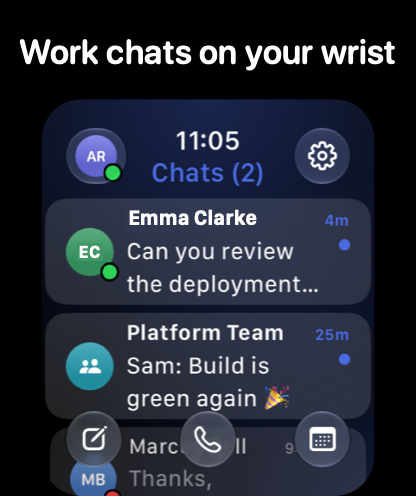
Strapline is an Apple Watch app for Microsoft Teams. It puts your Teams chats on your wrist: read your conversations, reply by dictation, scribble or a saved quick reply, react to messages and see whether colleagues are available. New messages arrive within seconds with the sender and a preview, and Strapline keeps working over Wi-Fi or cellular when your iPhone is out of reach.
Get Strapline on the App Store Support
What you can do on your Apple Watch
- See your recent Teams chats, newest first, updating live while Strapline is open.
- Get alerts for new messages within seconds, with the sender's name and a preview.
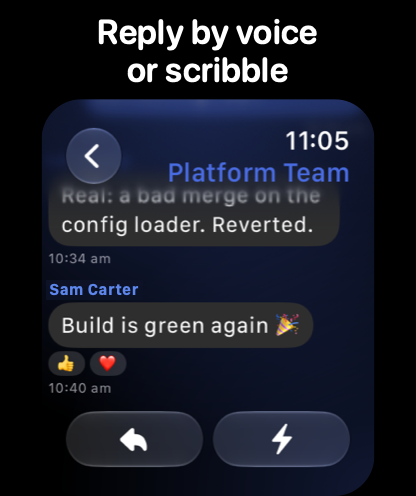
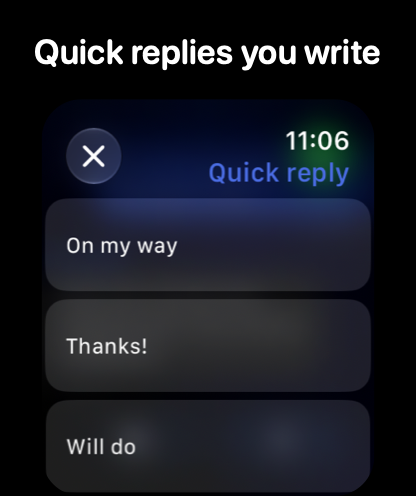
- Reply with dictation, scribble or quick replies you set up yourself.
- React to a message: like, love, laugh and more.
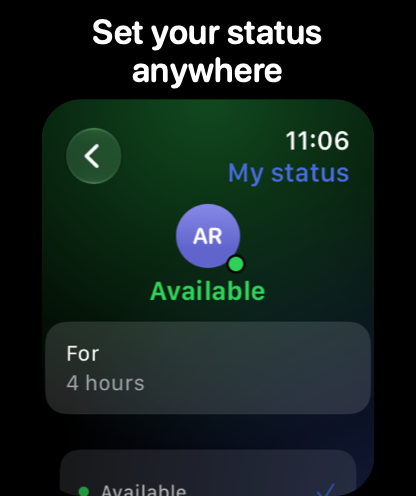
- See whether the person you are chatting with is available, busy, away or offline.
- Add a watch face complication with your unread count.
- Hide a chat from your watch list with one swipe.
- Try the built-in demo with sample chats before you sign in.
Teams calls from your wrist
With Strapline Pro + Calls you can call a colleague on Teams, or join a Teams meeting, from your watch over Wi-Fi or cellular, with no iPhone nearby. The plan includes 300 call minutes a month. Calling a phone number works too, if your organisation gives you a Teams Calling Plan or Teams Phone number.
Strapline does not receive calls: your watch will not ring for an incoming Teams call. Calls are not for emergencies. Do not use Strapline to call 000, 112, 911 or any other emergency number.
Get started in three steps
- Install Strapline from the App Store on your iPhone, or straight on your Apple Watch.
- Sign in with your work or school Microsoft account on Microsoft's own sign-in page, including multi-factor sign-in. Sign in once on your iPhone and your watch is signed in too, or sign in on the watch itself.
- Open Strapline on your watch. If you see "Need admin approval", send your IT administrator the link on the support page.
Plans
Strapline starts with a 3 day welcome period so you can try it with your own chats. Then choose Strapline Pro Monthly (A$2.99 a month), Strapline Pro Yearly (A$19.99 a year) or Strapline Lifetime (A$39.99 once, shared with Family Sharing). Prices are in Australian dollars including GST; other countries see their local price in the App Store.
Privacy and security
You sign in on Microsoft's page, so Strapline never sees your password. There are no Strapline accounts, no tracking and no advertising, and Strapline does not store your chats or messages. The only thing it keeps about calls is a count of the minutes you use. Read the privacy policy.
Strapline is published by Daeza Pty Ltd, a member of the Microsoft AI Cloud Partner Program. Its Microsoft Entra app is publisher verified, so the Microsoft sign-in and consent screens show Daeza Pty Ltd with a verified badge.
Questions
Can I use Microsoft Teams on my Apple Watch?
Yes. Strapline is an Apple Watch app that lets you read and reply to your Microsoft Teams chats, react to messages and see colleagues' status from your wrist. Install it from the App Store and sign in with your work or school Microsoft account.
Does Strapline need my iPhone nearby?
No. Once you are signed in, Strapline keeps working over Wi-Fi or cellular when your iPhone is out of reach. If your organisation uses Microsoft Intune, you sign in with Microsoft Authenticator on your iPhone and your watch works through it, so keep your iPhone nearby.
Which accounts work with Strapline?
A work or school Microsoft 365 account that includes Teams. Personal Microsoft accounts are not supported, because the Teams chat service does not offer them to apps.
Why do I see "Need admin approval"?
Many organisations require an IT administrator to approve apps that read Teams chats. Your administrator can approve Strapline for everyone in one step; the support page has the link and the list of permissions.
How much does Strapline cost?
Strapline is free to download with a 3 day welcome period. After that, Strapline Pro is A$2.99 a month or A$19.99 a year, or A$39.99 once for Strapline Lifetime, in Australia including GST.
Does Strapline read or store my messages?
Strapline shows your chats on your watch but does not store them, and there is no tracking or advertising. Your watch talks to Microsoft directly.
Need help? Visit support or email developer@daeza.com.au.
Strapline is an independent app and is not endorsed or sponsored by Microsoft. Microsoft Teams is a trademark of Microsoft Corporation. Apple Watch is a trademark of Apple Inc.